
Guides / Google Ads costs and budgets
 By Francisco Meza, founder of Planet Marketing · Updated November 2026
"I spent money on Google Ads and the phone didn't ring." I hear some version of that on almost every first call with a business that already tried Google Ads. When I open the account, it's almost always one of the same seven problems, and most of them show up in the first 15 minutes. Here's what I look for, with screenshots from real accounts, and how I fix each one.
The short answer
Google Ads usually stops bringing calls for one of these reasons:
- You're paying for the wrong searches: people looking for a paint store, a DIY video or a job.
- Your ads show outside your area: Google's default location setting and a radius that's too big.
- Search Partners and the Display Network are on: your money goes to websites and apps, not Google searches.
- Your bids are too low to show up: you sit under the Map Pack or on page 2.
- Conversion tracking is broken: nobody can tell which keywords bring calls, including Google.
- The landing page loses the call: wrong page, no tap-to-call, slow or a long form.
- Nobody answers the phone: the ad worked, the follow-up didn't.
1. You're paying for the wrong searches
This is the first thing I check, and the most common problem. Your keyword is not the search. Google matches your keyword to searches it thinks are related, and "related" can be a long way from someone who wants to hire you.
Here's a real example from Double G Painters, a painting contractor I work with in San Diego. Before I took over the account, their ads were showing for people looking for a paint store. Searches like "sherwin williams" and "dunn edwards la mesa" got 85 clicks, about $940 of their budget. Someone searching "sherwin williams" wants to buy a gallon of paint, not hire a painter.
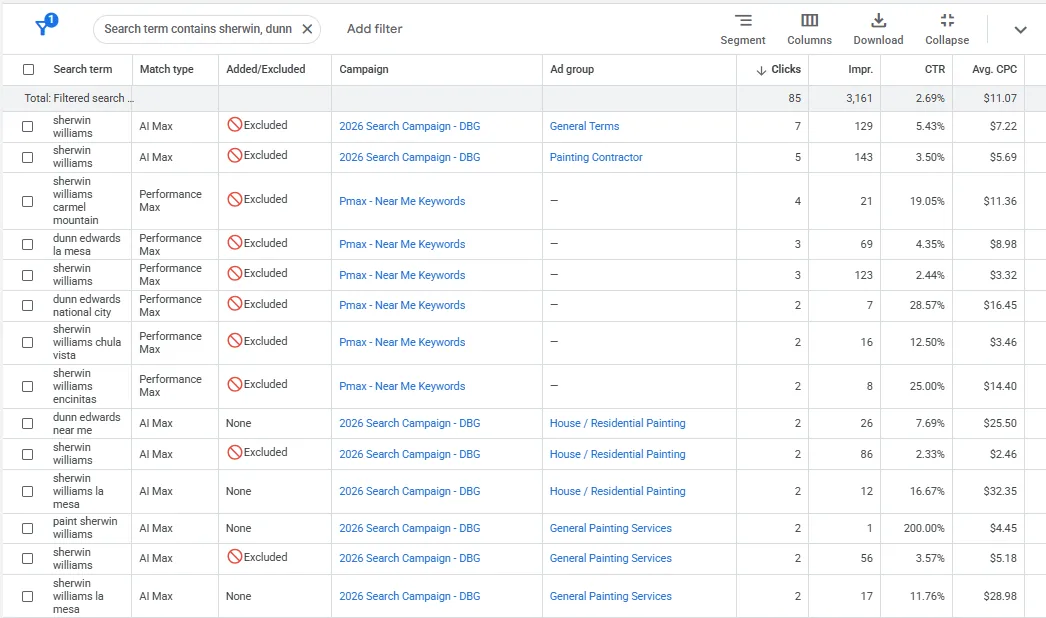
Look at where those clicks came from. Almost none came from a keyword anyone chose. They came from "AI Max" and "Performance Max," Google's automated campaigns that find searches for you (more on those in the questions below).
It happens with regular keywords too. Here's a drywall contractor I work with, from before they hired me. The "Keyword" column shows what they bid on, and the "Search term" column shows what people actually typed:
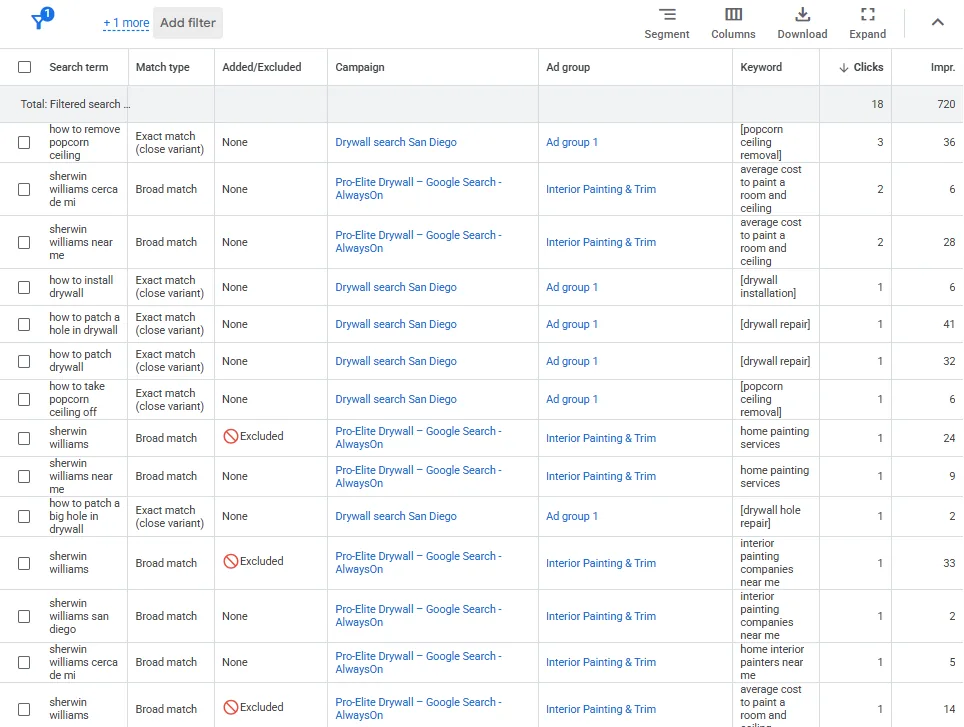
Even exact match isn't exact anymore. Google calls those "close variants," and "how to patch drywall" counts as one for [drywall repair]. Someone asking how to patch drywall is about to do it themselves.
How to check yours: in Google Ads, go to Campaigns, then Insights and reports, then Search terms. Set the date range to the last few months and read the list. Every search that would never turn into a job is money you can stop spending.
The fix:
- Exact match only, on searches where someone wants to hire: "drywall repair near me," "house painter," "panel upgrade." No broad match, no phrase match.
- A negative keyword list that blocks the searches that will never call you: store names, brand names, "how to," "DIY," "jobs," "salary," "free." I add to it every week from the search terms report.
- No AI Max or Performance Max for a trade. I keep the keywords in my hands, not Google's.
Here's the negative keyword list in my own Google Ads account. I named it what it is:
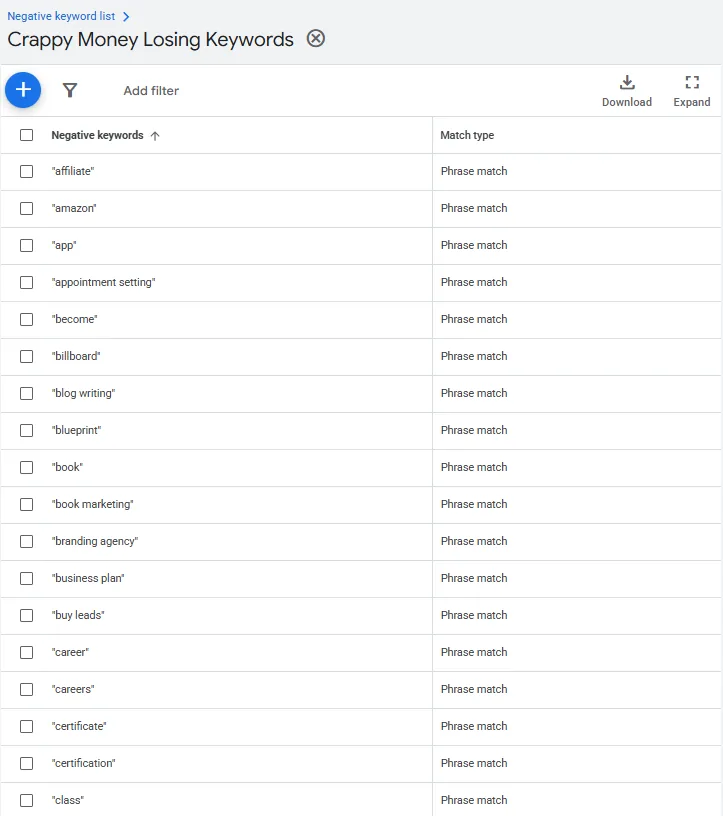
Negative keywords are the one place I use phrase match. A phrase-match negative like "career" blocks every search with that word in it, which is exactly what you want.
Want to know what your account is paying for? Send me your Google Ads customer ID and I'll send back the searches that are wasting your budget, and what they cost. Get my free Google Ads audit
2. Your ads show outside your area
You picked your city. Google still showed your ad to someone 300 miles away. That's because of a setting most people never open: Location options.
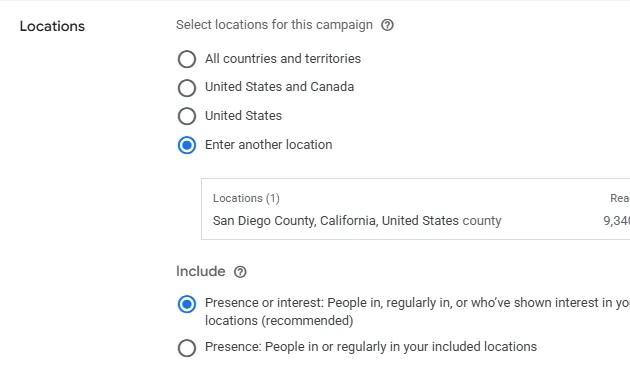
"Presence or interest" means Google can show your ad to people who are interested in your area, not just people who are in it. Someone in Phoenix reading about San Diego can see an ad for a San Diego drywall contractor. "Presence" means people who are actually in or regularly in your area. For a local service business, I always choose Presence.
The second problem is the area itself. A lot of owners target the whole county, or a 50-mile radius, because they'd take a job anywhere. But a homeowner 40 minutes away will almost always call someone closer, and you pay for the click either way. I start my clients within about 10 to 15 miles of their location, or the ZIP codes where their best jobs come from, and widen it once the close-in area is working. I explain the same idea for Google Maps in How to Rank Higher on Google Maps.
The fix: open each campaign's settings, go to Locations, click Location options and pick Presence. Then tighten the area to where your jobs actually come from.
3. Search Partners and the Display Network are on
When you create a Search campaign, Google checks two boxes for you: Google Search Partners and the Google Display Network. Search Partners puts your ad on other sites' search pages. The Display Network turns your ad into a banner on websites and in apps.
That's where a lot of clicks come from that never call. Someone playing a game on their phone taps your ad by accident, and you pay for it. Someone searching on Google for "water heater repair" is the person you want, and that's who you get when both boxes are off.
In my experience, the Display Network is almost a complete waste of money for cold traffic, meaning people who have never heard of you. The one place it can earn its keep is remarketing: showing ads to people who already visited your website. That's a separate campaign with its own budget, not two checkboxes inside your Search campaign.
The fix: in the campaign settings, under Networks, uncheck both. Your Search campaign should run on Google Search, nothing else.
4. Your bids are too low to show up
This one surprises people, because it sounds like saving money. A low bid doesn't get you cheap calls. It gets you shown below the Map Pack, at the bottom of the page or not at all. On a phone, the searcher has already called someone else by the time they'd scroll to you.
Two real examples from accounts I've looked at:
- A contractor's campaign set at $5 a click, in a market where the top of the page cost far more. It ran for weeks and never spent a dollar, because it never won a single auction.
- An electrician's campaign that was losing 72% of the searches it qualified for to "rank," which means Google showed a competitor instead because the bid and ad quality weren't enough.
How to check yours: on the keywords page, add the Search lost IS (rank) column. If it's high, you're missing most of the searches you're paying to be in, and the problem isn't your budget, it's your bid or your ad quality.
Ad quality matters too. Google rates each keyword's Quality Score from 1 to 10, and a low score means you pay more per click to get the same spot. The fastest way I know to raise it: one ad group per service, the service in the headline, and an ad that sends people to a page about that exact service.
The fix: I bid on fewer keywords, but high enough to show at the top of the page, using the top-of-page bid estimates in Keyword Planner. Then I raise bids on the keywords that bring calls and cut the ones that don't. If you're wondering what a click costs in your trade, I broke it down in How Much Does Google Ads Cost?
5. Conversion tracking is broken or counting twice
If nobody can see which keywords bring calls, nobody can fix the account. And if Google can't see them, its automated bidding learns from bad information and spends more on whatever it thinks is working.
These are the problems I find most often:
- Nothing is tracked. The account shows clicks and cost, and zero conversions, even though the owner knows some calls came in.
- The wrong things are tracked. A page view or "time on site" counted as a lead. The account looks great, and the phone is quiet.
- Leads counted twice. A form tracked by Google Ads and the same form imported again from Google Analytics. Every lead shows up as two.
The fix: I set up three conversions directly in Google Ads for every client: a form submitted, a tap on the phone number and a tap on the text button. I don't import the same leads from Google Analytics on top of them. Then I test each one myself before I trust the numbers.
6. The landing page loses the call
The ad did its job and someone clicked. Then the page lost them. Most people who click a local service ad are on their phone, ready to call, and they leave in seconds if the page makes that hard.
- The ad goes to the home page. Someone who searched "popcorn ceiling removal" lands on a page about everything you do and has to go looking. Send each ad to a page about that service.
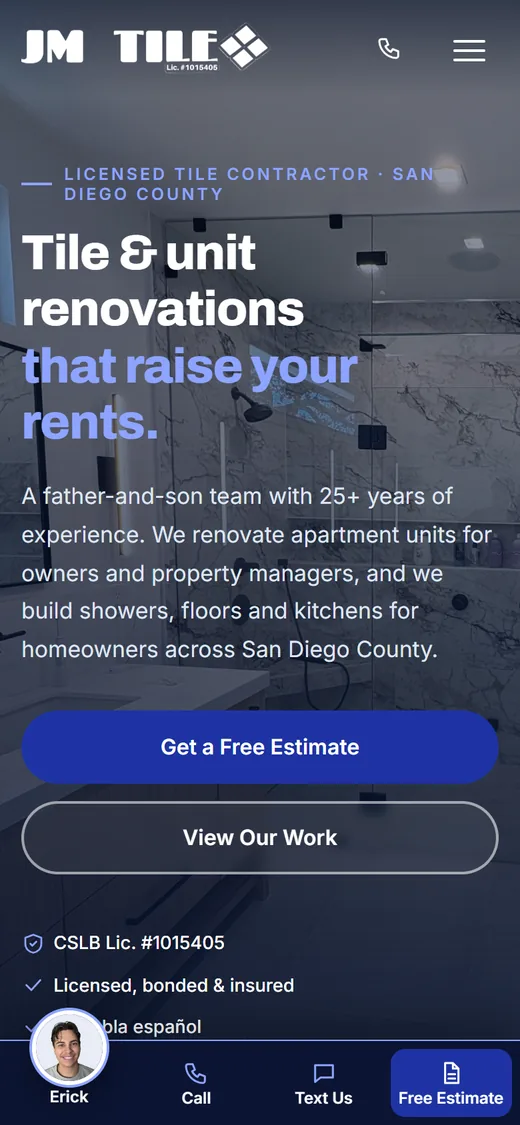
- No tap-to-call on the phone. The number is in an image, or tucked in the footer. On my clients' sites, a call and text bar stays at the bottom of the screen the whole time, like JM Tile's.
- The page is slow. A page that takes five seconds to load on a phone loses a lot of the clicks you paid for before anyone sees it.
- The form is too long. Name, phone, what you need. Every extra field loses people.
The fix: one page per service, the phone number and a text button visible on every screen, and a short form. Open your own ad on your phone and try to call yourself. If it takes more than one tap, it's costing you jobs.
7. Nobody answers the phone
Sometimes the ads are working fine. The calls come in at 10 AM while the owner is on a ladder, go to voicemail, and the customer calls the next company on the list. Google Ads gets the blame for a problem that happened after the click.
- Run ads when someone can answer. If nobody picks up after 5 PM, use an ad schedule so your budget goes to the hours you're answering.
- Text back missed calls right away. A lot of people don't leave voicemails anymore, but almost everybody replies to a text. Most phone systems can send an automatic text when you miss a call: "Sorry I missed you, I'm on a job. What can I help with?" It keeps a lot of those customers from calling the next company.
- Reply to forms within the hour. The first business to reply usually gets the job.
For clients I work with long term, I go a step further and set up an AI assistant that answers the calls you can't, texts the customer back and books the appointment. Most people would still rather talk to a real person, so it doesn't replace you. It catches the calls that would otherwise go to voicemail and never come back.
Look at your call log next to your ad spend. If calls are coming in and jobs aren't, the fix is in the office, not in Google Ads.
Bonus: link your Business Profile and show up on Google Maps too
Once the basics above are fixed, there's one more thing I set up for every local client: linking the Google Business Profile to the ads account. That lets your ad show as a sponsored pin inside Google Maps, not just on the search results page.
When you also rank in the free Map Pack, you can show up three times on the same search: a Search ad at the top, a sponsored pin in Maps, and your free listing. I call it the Triple Stack, and I show a real one in How to Rank Higher on Google Maps. Your star rating shows on the sponsored pin too, which is why I start review requests early.
What I check in a free Google Ads audit
Everything above is what I go through when someone sends me their account. I read the search terms going back several months, check the location, network and bid settings, look at what's being tracked as a conversion, and open the ads on my phone the way a customer would. Then I send back what I found, what it's costing, and the three fixes I'd make first.
Is your Google Ads account wasting money? Send me your customer ID (the 10-digit number at the top of your Google Ads account). I'll look, I won't change anything, and you can remove my access anytime. Get my free Google Ads audit