
Guides / Google Maps and reviews
 By Francisco Meza, founder of Planet Marketing · Updated November 2026
"How do I get more reviews?" and "How many reviews do I need?" come up in almost every first call I have with a local business. Reviews decide who gets the call on Google Maps, so here's exactly how I set up review requests for my clients, and how I work out how many reviews a business needs to pass the competitors around it.
The short answer
Ask every customer, the same day you finish the job, with a text message that has your direct Google review link in it. That's most of it. The businesses with hundreds of reviews aren't doing anything clever. They just ask every time, and they make it one tap.
- Get your review link from your Google Business Profile (it takes 30 seconds, steps below).
- Text it after every job. Email it as a backup.
- Print the QR code on your business cards, invoices and leave-behinds.
- Reply to every review, good or bad.
- Never pay for reviews or reward people for leaving them.
Google wants you to ask (Yelp doesn't)
I remember when Yelp would penalize business owners for asking customers to review them. Yelp still tells businesses not to ask for reviews, and it can flag a business that does.
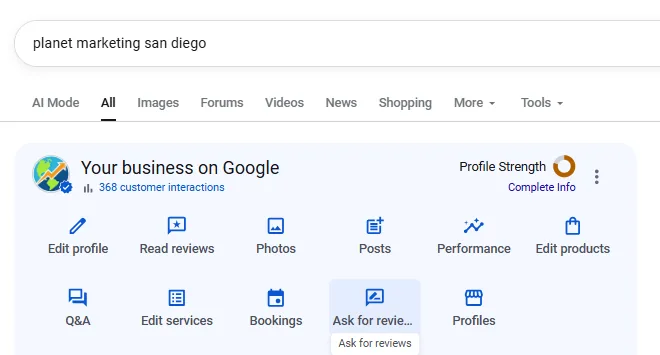
Google is the opposite. When you search your own business name while signed in, Google puts an "Ask for reviews" button right on your profile, next to Edit profile and Read reviews. Google wants more reviews on your profile, because reviews help people choose. Asking is fine. Asking the right way is what matters.
Get your Google review link and QR code
Your review link opens the "write a review" box on your profile directly, so the customer doesn't have to search for you, find the right listing and scroll to the reviews. Every step you remove gets you more reviews.
- Sign in to the Google account that manages your Business Profile.
- Search your business name on Google.
- Click Ask for reviews.
- Copy the review link. It looks like
g.page/r/.../review.
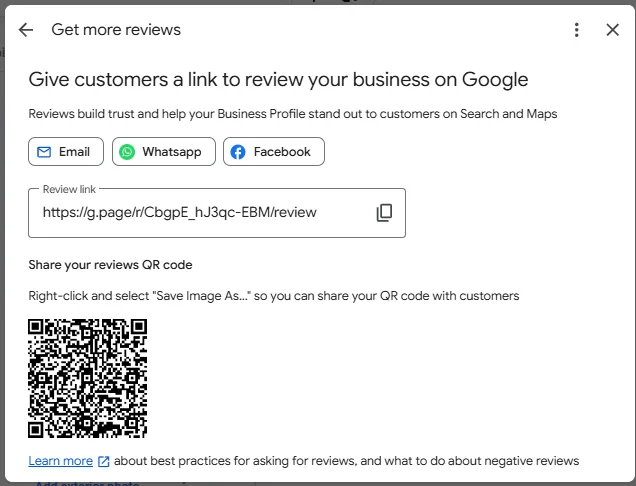
Save the link in your phone's text replacements or your CRM so anyone on your team can send it in two seconds.
Ask by text message (it works best)
Text is where I see the most reviews come from. People read texts within minutes, and the link opens Google on the phone already in their hand. Send it the same day, ideally within an hour or two of finishing the job, while the customer is still happy about it.
Here's a text you can copy:
Hi Maria, thanks for choosing [Your Business] today. If you have 30 seconds, a Google review helps a small business like ours a lot: g.page/r/your-link/review. Thank you! [Your name]
- Use their first name and yours. It reads like a person, not a system.
- Put the link in the first text. Don't make them reply "sure" first.
- Send it from the business number or the tech who did the job.
- Follow up once a few days later if they haven't left one. Never more than that.
If your phone system or CRM can send it automatically when a job is marked done, set that up. The best review program is the one that runs without anyone having to remember.
Ask by email
Email works as a second channel, especially for customers who booked online or prefer email. Keep it short, with one button or link and nothing else to click.
Subject: Thanks from [Your Business] (30-second favor?)
Hi Maria, thank you for having us out today. If you were happy with the work, would you leave us a quick Google review? It helps neighbors find a contractor they can trust. Leave a review: g.page/r/your-link/review. Thanks, [Your name]
"If you were happy with the work" is fine as friendly wording. Just send the same email to every customer, not only the ones you think were happy. More on that in the rules below.
Put the QR code on everything you hand out
The QR code is for customers standing in front of you. Download it from the same "Ask for reviews" window and put it on:
- The back of your business card: "Happy with the work? Scan to leave us a Google review."
- Invoices and receipts, printed or PDF.
- A leave-behind card your techs hand over at the end of the job.
- The front counter or checkout, if customers come to you.
A card on the counter is the backup, not the plan. The text message still does most of the work, because it reaches people after they've gone home and seen the finished job.
How reviews affect your Google Maps ranking
Google ranks Maps listings on three things: how relevant your business is to the search, how close you are to the person searching, and how prominent your business is. Reviews are a big part of that last one. Google says high-quality, positive reviews can improve your visibility. Here's what I watch when I look at a business's reviews next to its competitors:
- Number of reviews. How many you have compared with the businesses ranking above you.
- Frequency of reviews. A few new reviews every week beats a burst of 30 in one month and then nothing. Customers notice when your newest review is from last year, and in my experience so does Google.
- Average star rating. It shows on your Maps listing and on your sponsored pin, and it's often the first thing a customer compares.
- The owner replying. Google recommends replying to reviews, and future customers read your replies, especially to the bad ones.
- Who is leaving the review. A review from a Local Guide with years of reviews and photos looks more trustworthy than a review from an account that was created yesterday, to customers and, as far as I can tell, to Google.
- What the review says. A customer who writes "fixed our panel in Oakland the same day" describes your service and your area in their own words. You can't tell people what to write, but asking about the specific job ("how did the panel upgrade go?") tends to get more detailed reviews.
How many Google reviews do you need?
There's no magic number. You need enough to compete with the businesses already in the top 3 for your search, in your area. Ten reviews can be plenty in a small town and nothing in a big city.
To find the real number, I run a Local Falcon scan. It checks where a business shows up on Google Maps from 25 spots across its service area, and it lists the competitors taking the top 3, with their ratings and review counts. Here's what a scan showed for an electrician I work with in the East Bay, searching "electrician near me":
| Business | Rating | Reviews | Top 3 share |
|---|---|---|---|
| Competitor A | 5.0 | 239 | 36% |
| Competitor B | 4.9 | 676 | 20% |
| Competitor C | 4.6 | 22 | 16% |
| My client | 5.0 | 7 | 0% |
"Top 3 share" is the share of the 25 spots on the map where that business showed up in the top 3. Local Falcon scan, October 2026.
A perfect 5.0 wasn't enough. With 7 reviews, my client didn't make the top 20 at any of the 25 spots, not even next to their own address. The two businesses that owned the map had 239 and 676 reviews.
But look at Competitor C: 22 reviews and a 4.6 still won 16% of the map. Reviews aren't the only thing. The right Google categories, a complete profile, a website with a page for each service, and where your business is located all count too. That's why I look at the whole picture before I set a review goal.
The goal I usually set: close the gap with the top 3 in your own scan, and add new reviews every week faster than they do. You don't need 676 reviews to start winning spots. You need to look at least as strong as the businesses Google is showing instead of you.
Want to see your own competitors' numbers? I'll run a free Local Falcon scan of your service area and show you who's in the top 3, their ratings, their review counts and where you rank. Get my free Maps scan
Reply to every review, even the bad ones
Thank every happy customer by name and mention the job if you can. It takes a minute and it shows the next customer that a real person runs the business.
A bad review is worse if you ignore it, and even worse if you argue. Reply within a day or two, stay calm and say how you'll make it right:
Hi James, I'm sorry the job ran a day later than we promised. That's on us. I'd like to make it right, so please call me directly at [your number]. [Your name], owner
Most people reading that reply aren't James. They're your next customers, and they're watching how you handle a problem. A calm owner reply can win more trust than the bad review cost you.
What Google doesn't allow
Google removes reviews that break its rules, and it can restrict a profile or show customers a warning that fake reviews were removed. Stay away from these:
- Paying or rewarding reviews. No discounts, gift cards, raffles or "free service for a 5-star review." Not even for honest reviews.
- Asking only happy customers. Google doesn't allow review gating, where you send a survey first and only send the review link to people who answered well. Send the same request to everyone.
- Fake reviews. No reviews from yourself, your employees or family, and never buy them. Google is good at spotting them.
- Reviews written for the customer. You can make it easy. You can't put words in their mouth.
Everything in this guide stays inside those rules. Ask everyone, make it easy, and let the reviews come in on their own schedule.
Strong reviews make the Triple Stack possible
Once your reviews put you in the Map Pack, you can show up three times on the same search: a Search ad at the top, a sponsored pin in Google Maps, and your free listing in the Map Pack. I call it the Triple Stack.
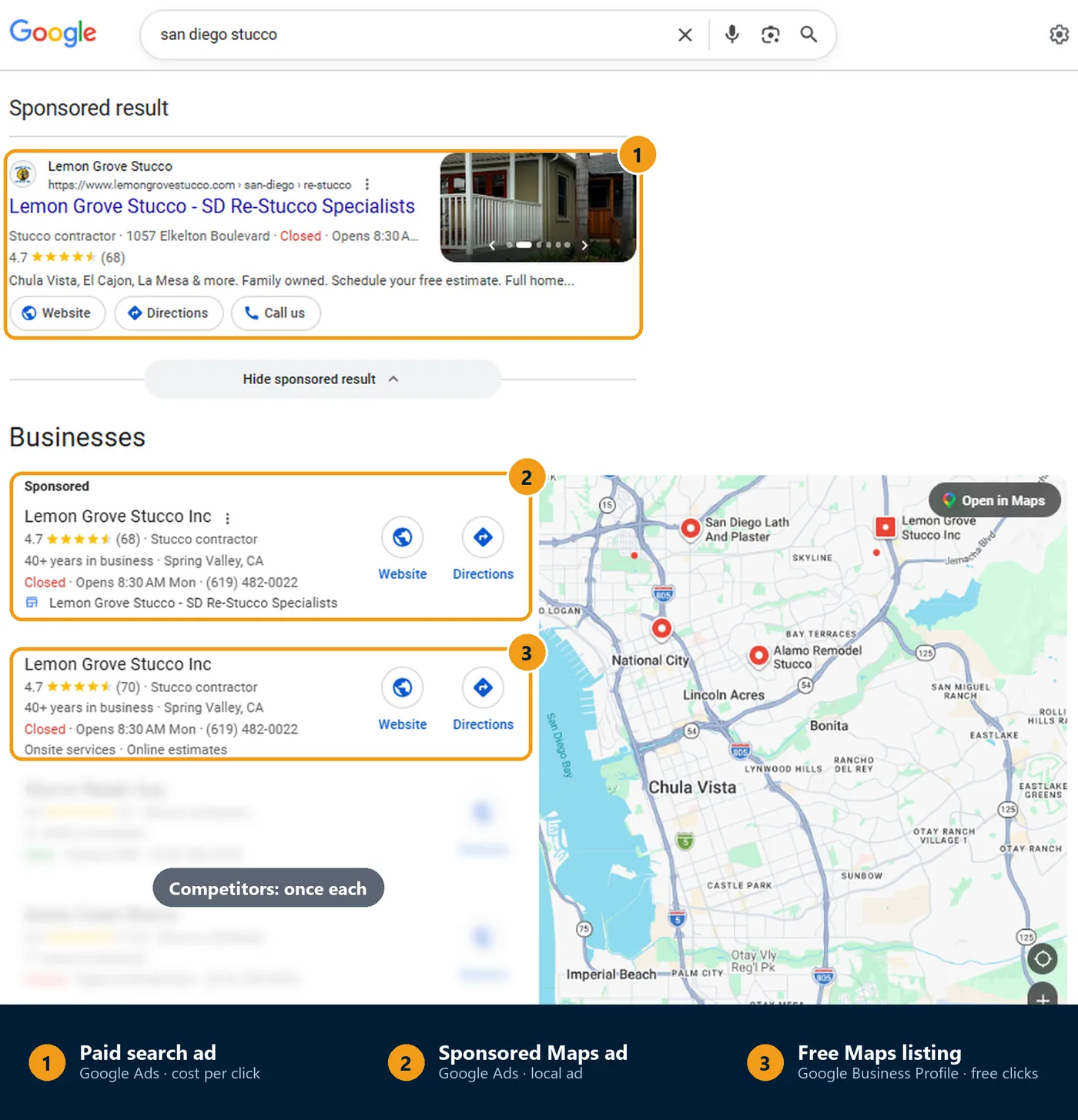
When a homeowner sees the same company three times, with a strong star rating every time, it looks like the obvious choice. Your rating shows on the sponsored pin too, so good reviews make your ad money work harder. That's why I start review requests before I spend a dollar on Maps ads. If you're wondering what the ads side costs, I broke it down in How Much Does Google Ads Cost?