
Guides / Google Maps and reviews
 By Francisco Meza, founder of Planet Marketing · Updated November 2026
"Why don't I show up on Google Maps?" is one of the first things a business owner asks me. Usually they do show up, just not high enough to be in the top 3 listings. Here's how I find out where a business really ranks, and what I fix, in order, to move it into the top 3.
The short answer
To rank higher on Google Maps:
- Get verified and keep your address stable.
- Pick the same primary category the businesses in the top 3 use.
- Set a service area of nearby neighborhoods, not the whole county.
- Fill in every part of your profile and add real photos.
- Get new reviews every week and reply to all of them.
- Give each service its own page on your website.
Then measure it the right way, with a ranking scan across your whole service area, not by searching from your own phone.
"Where do I rank?" has no single answer
Google Maps results change from one neighborhood to the next. When you search from your shop, you're standing next to your own pin, so you see yourself at your best. A customer two miles away can see you at #8, and one ten miles away may not see you at all.
That's why I don't trust a single search. I run a Local Falcon scan: it checks your Google Maps position for one search from a grid of points across your service area, usually 25 points in a 5 by 5 grid, and puts the results on a map. Each dot shows where you rank when someone standing on that spot searches.
- Green (1 to 3): you're in the Map Pack, the three businesses Google shows with the map. This is where the calls come from.
- Yellow and orange (4 to 10): you show up, but only if they tap "more places."
- Red (11 to 20+): for customers on that spot, you basically don't exist.
The number I watch most is top 3 share: on how many spots of the map are you in the top 3?
A real before and after
Here's Lemon Grove Stucco, a stucco contractor in San Diego, for the search "San Diego stucco," scanned on a grid of 21 points across San Diego County.
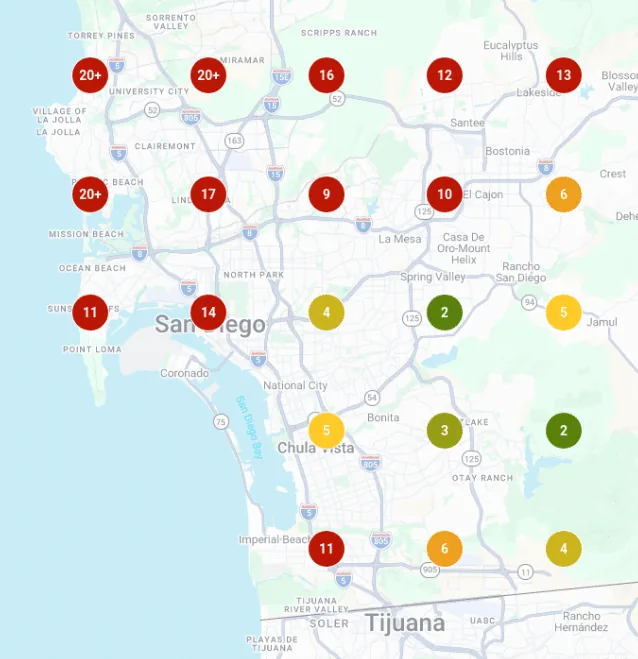 Before
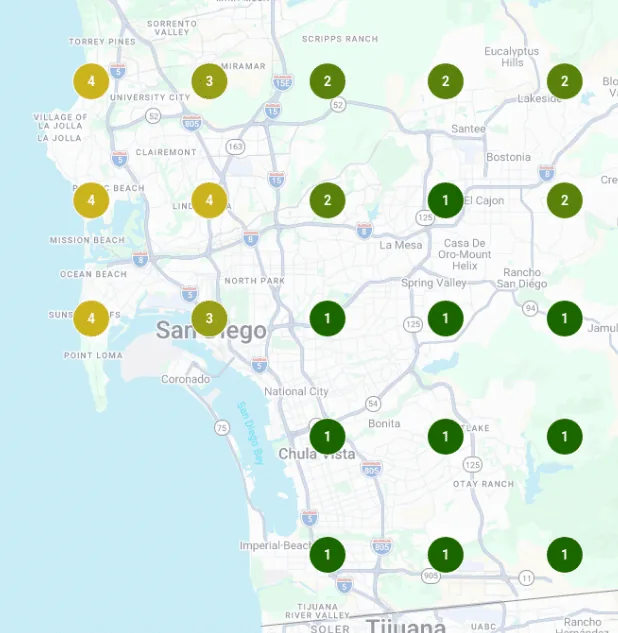 After
That took under four months, from the same address. The work went into the profile, the reviews and the website, which is what the rest of this guide covers.
How Google decides who shows up
Google says local results come down to three things (How to improve your local ranking on Google):
- Relevance: how well your profile matches the search. Your categories, services and description do most of the work here.
- Distance: how far your business is from the person searching. You can't change this, which is why your rankings fade the farther you get from your address.
- Prominence: how well known and trusted your business is. Reviews, your website and how much of the web mentions you all count.
You can't move your shop. Almost everything else is in your hands.
Step 1: Get verified, and be ready for a video call
An unverified profile doesn't rank. Google verifies businesses in a few ways, and more and more often it's by video.
A few weeks ago I did a live video verification with a Google Business Profile specialist for Double G Painters, a painting company I work with in San Diego. I went to their office with my phone. The specialist had me film the business sign from the street, then turn around and film the other side of the street, taking snapshots as we went. Inside, they took snapshots of the sign on the door, the office and the kitchen.
Google is checking that a real business operates at that address. Before your call:
- Have permanent signage up, outside the building and on the door. A paper sign taped to a window won't help.
- Be ready to turn around. They asked me to turn 180° so they could see the other side of the street.
- Be ready to walk them through the inside. What they asked for was: show me the signage on the front door, show me the office, show me the kitchen.
Once the profile was verified, I linked it to Double G's Google Ads account. Now their ads show inside Google Maps, with their pin, their star rating and their address, in the same area where they're climbing the free rankings. More on that below.
Home-based businesses
Plenty of contractors work from home, and Google allows it. You can hide your address and show a service area instead. In my experience verification is harder, though, because there's no storefront or street sign to film. If I were verifying a home-based business, I'd have a branded vehicle, tools and paperwork ready to show on camera, since there's no office to walk through.
Hiding your address doesn't change how distance works. Google still uses your real address as the center of your rankings, so you'll rank best close to home and fade as you go out.
Be careful changing your address
Changing your address, business name or category can send your profile back through verification. While that happens your profile can drop out of search, and your rankings start over from the new location. If you're moving, plan it: get the new signage up first, update the address once, and expect to verify again.
Having a hard time getting verified? Stuck on a video call that keeps failing, a request that never gets approved, or a profile that went back to "unverified" after a change? I've been through it with clients and can help you get it done. Text me at (619) 332-2345 or send me a message.
Step 2: Use the categories that win in your area
Your primary category is the strongest relevance signal you control, and a wrong one is one of the most common problems I find. A Local Falcon report shows the categories each competitor in the top 3 uses, so you can see exactly what Google is rewarding for your search, in your area. Two examples from recent scans:
- A solar panel cleaning company in San Diego had "Gutter cleaning service" as its primary category. Every business winning "solar panel cleaning near me" used "Solar panel maintenance service." The company made the top 20 on just 1 of 25 spots.
- A used car lot in El Cajon used "Car dealer," with no used-car category at all. All three Map Pack leaders used "Used car dealer." The lot was in the top 3 on 0 of 25 spots.
Pick the primary category that matches your business the most. Then add every secondary category that truly fits what you do.
Step 3: Think neighborhoods, not the whole county
Many service businesses want to show up across their entire county, in the free Maps results and with their Google Ads. That's not how Google Maps works. Distance matters, so your profile shows best near your address and fades as you go out.
Take a contractor at the edge of a big county, where the far side of the county is a 50-mile drive away. His Google Business Profile isn't going to rank in the top 3 for someone searching 50 miles from his address, and listing the whole county as his service area won't change that.
What I recommend instead: set your service area to the cities and neighborhoods within about 10 to 15 miles of you, the places you can realistically win. You have a much better chance of showing up there than 50 miles away, and those are the customers you can reach fastest anyway.
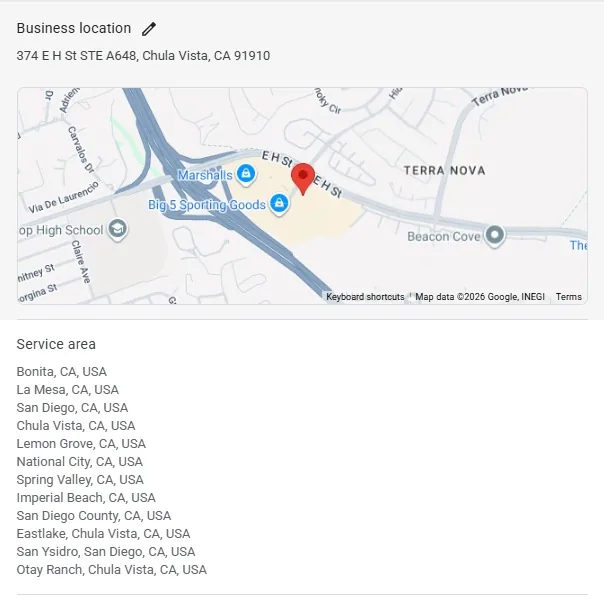
The same goes for Google Ads. Point your ad money at the areas around your location, where your sponsored pin and your free listing can work together, instead of spreading it thin across the whole county.
Step 4: Fill in everything, with real photos
- Services: list each one, with a short description in the words customers search.
- Description: what you do and where, written for people, not stuffed with city names.
- Hours and phone number that match your website exactly. If your profile says you open at 7 and your website says 8, Google doesn't know which one to trust.
- No call tracking number on your profile. Don't put a CallRail or other tracking number on your Google Business Profile. Google can't tell which number is the real one, and all you'll do is confuse it. Use your main business number, the one on your website and your sign.
- Real photos of your jobs, your team and your vehicles, added every month. Skip the stock photos.
- Posts: a short update with a photo every week or two shows Google and customers that the business is active.
- The same name, address and phone everywhere: your website, Yelp, Facebook, Angi and directories. Mismatches confuse Google.
Step 5: Reviews, every week
Reviews are the biggest part of prominence, and they're what customers compare first. What I watch:
- Number of reviews, compared with the businesses in the top 3 for your search.
- Frequency. One review a week beats one review a year. A business that gets new reviews all the time looks alive, to customers and to Google.
- Your average rating, which shows on your listing and on your sponsored pin. A bad review once in a while is okay. It shows you're a real company, and a perfect wall of 5-stars can look too good to be true.
- Replies. Answer every review, good and bad, within a day or two. Customers read your replies, and Google recommends replying.
The scan also shows your competitors' ratings and review counts, so you know the real target. I covered the text messages, the review link and the QR code in How to Get More Google Reviews.
Step 6: A page for each service
Your profile links to your website, and Google reads that site to understand what you do. A one-page site with three short service blurbs gives it very little to go on. A page for each service, with your own job photos and the areas you serve, connects your profile to every job you want: panel upgrades, EV chargers and rewiring for an electrician, or stucco repair and re-stucco for a stucco company.
Link your profile to the page that matches your primary category, and make sure your name, address and phone on the site match the profile exactly.
What gets profiles suspended
Some shortcuts work for a while, which is why you'll see competitors using them. They're against Google's rules, and I don't do them for clients:
- Keywords stuffed into the business name. (Google's guidelines) "Mike's Plumbing - Best Plumber San Diego 24/7 Emergency" when the sign on the door says "Mike's Plumbing." Your business name on Google has to match your real-world name. If a competitor does this, you can suggest an edit on their listing or report it to Google.
- Fake or virtual-office addresses. A mailbox store or a coworking desk you never use is not a business location, and video verification makes these easy to catch.
- Fake or paid reviews. Google removes them and can restrict your profile.
The payoff: the Triple Stack
Once you're in the top 3 on Google Maps, you can show up three times on the same search:
- A Search ad at the top of the page.
- A sponsored pin in Google Maps, which needs your verified profile linked to Google Ads.
- Your free listing in the Map Pack.
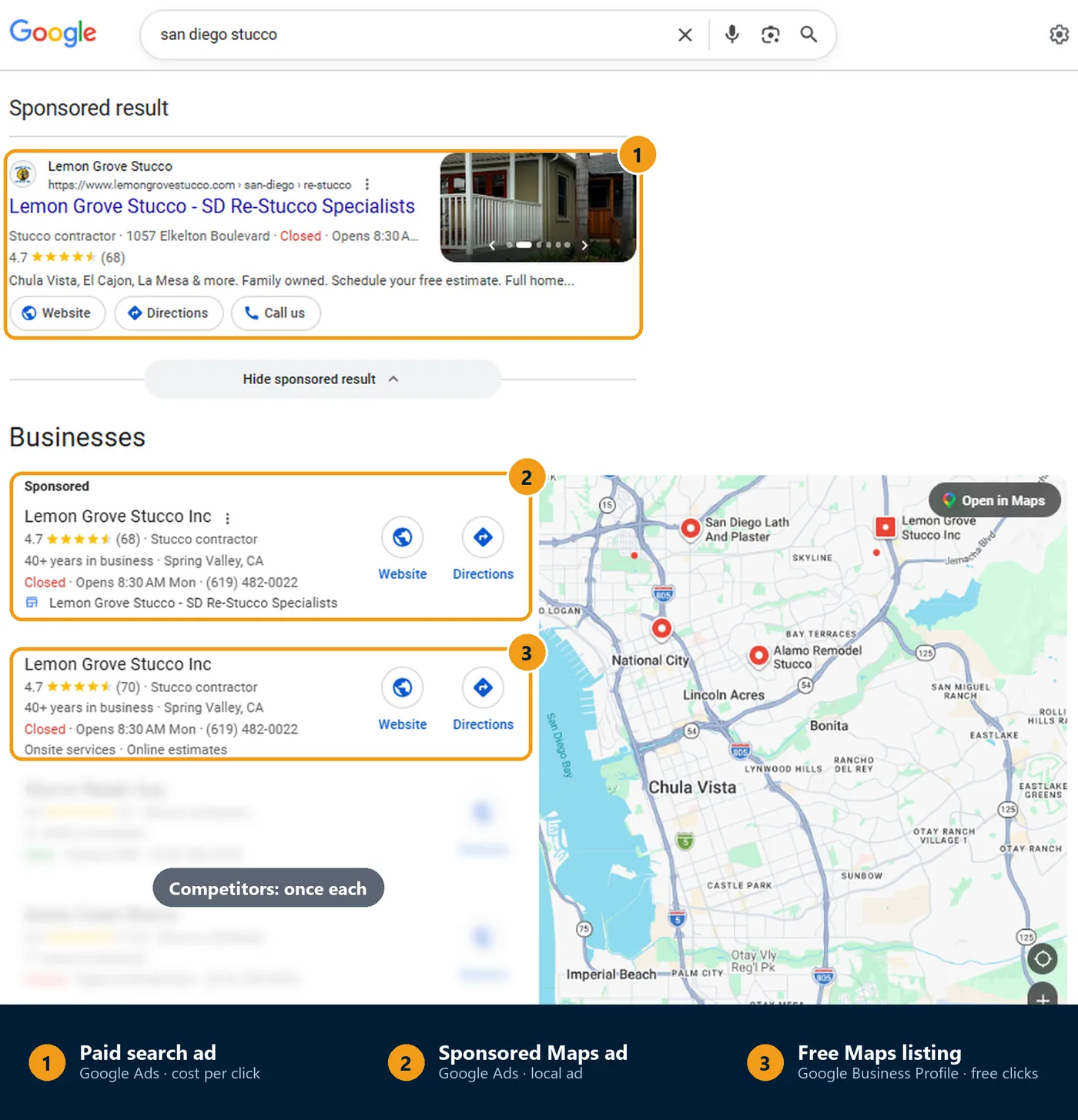
When a homeowner sees the same company three times on one page, it looks like the obvious choice. The sponsored pin also fills the gaps in your scan: the red spots too far from your address to rank for free are exactly where a Maps ad can still put you in front of customers. I explain what that costs in How Much Does Google Ads Cost?
How long it takes
The goal I set for most clients: into the top 3 around your own location within about 90 days, then spread outward across the rest of the map. Category fixes can move things within a few weeks. Reviews and website pages build over months.
Rescan the same grid, with the same search, every 30 days. That way you're measuring progress, not guessing from your own phone.
Want to see your own map? I'll run a free Local Falcon scan of your service area and show you where you rank, who's in the top 3, and their categories, ratings and review counts. Get my free Maps scan